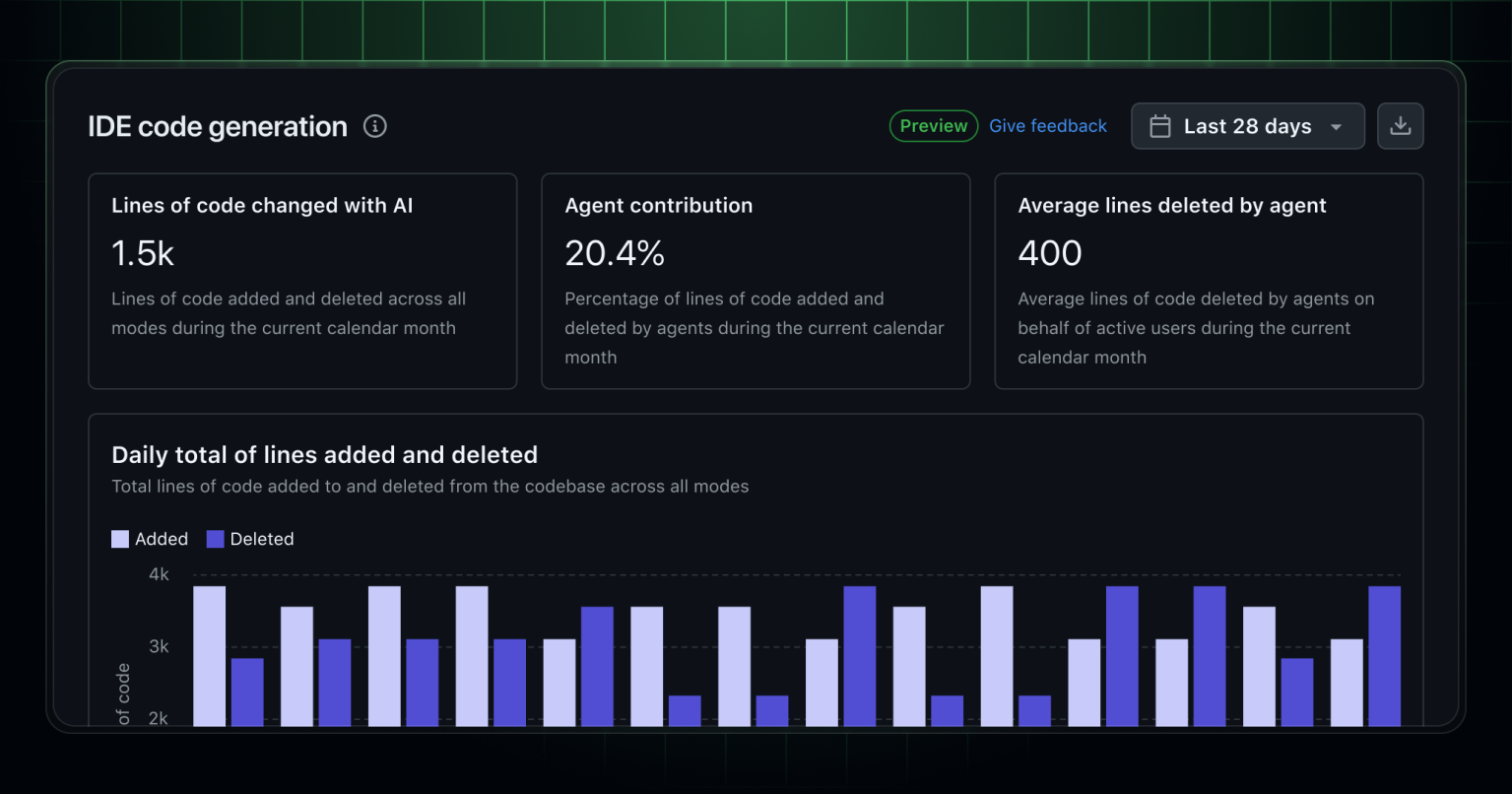
Adopting AI tools like GitHub Copilot can transform how enterprise teams write and manage code. But without clear visibility into Copilot's contributions, gauging its true value is challenging. GitHub now includes a comprehensive dashboard designed to track Copilot code generation metrics, making AI's role in your development process transparent and measurable.
Explore Dashboard Highlights
- Aggregated Code Generation Activity: Get a complete view of all code changes powered by Copilot within your enterprise, giving leaders crucial data on AI adoption and its impact.
- Lines of Code Changed with AI: Monitor the total lines added or deleted by Copilot, offering a tangible sense of the AI's influence across repositories and projects.
- User-Initiated vs. Agent-Initiated Changes: Distinguish between code that users accept or add after Copilot suggestions and code automatically generated by Copilot agents, helping teams understand collaboration dynamics.
- Activity by Model and Language: Break down code generation by specific AI models and programming languages, revealing trends and areas for workflow optimization.
How to Access the Dashboard
Start by navigating to the Enterprises page within GitHub, then select your enterprise and open the Insights tab. From the sidebar, choose Code generation to launch the new dashboard. For those needing deeper analysis, NDJSON downloads of all metrics can be generated directly from the dashboard interface.
It's important to first enable the Copilot usage metrics policy under the AI Controls section in your enterprise settings. Access to these insights is limited to enterprise owners, billing managers, or users with custom roles that include the View Enterprise Copilot Metrics permission, ensuring sensitive data is protected.
Why This Matters for Your Team
- Transparency: Visualize exactly where and how Copilot is making changes, building trust in AI-generated code and the workflows it supports.
- Optimization: Use detailed metrics by language and model to fine-tune AI adoption strategies for peak productivity and efficiency.
- Accountability: Clearly see the balance between user-driven and agent-driven code changes, allowing for better oversight and process evaluation.
- Informed Decision-Making: Leverage granular data to guide policy, training, and the integration of AI into your development lifecycle.
What to Keep in Mind
The Copilot code generation metrics dashboard is currently in public preview, so you may notice updates as GitHub incorporates feedback and continues to develop the user experience. For setup help and troubleshooting, consult the official GitHub documentation accessible through the dashboard itself.
Takeaway
With the new Copilot code generation metrics dashboard, enterprises can finally make data-driven decisions about AI-powered development. By shining a light on Copilot's contributions, GitHub is empowering teams to innovate with confidence and clarity. To learn more, see th documentation.
Let's Unlock Your Data's Full Potential
Thanks for reading! Metrics dashboards like this one from GitHub are a great reminder that visibility drives improvement. But the real magic happens when you pair that visibility with the right automations and custom-built tools. Over my 20+ years working with everyone from early-stage startups to global tech leaders, I've helped teams unlock their data's full potential by building solutions tailored to their unique challenges.
Curious about how to take your AI-powered development to the next level? Whether you want to automate insights delivery, build a custom dashboard that ties directly into your internal systems, or streamline your entire development lifecycle, I'd love to help. Explore my software development and automation services, and let's schedule a free consultation to see what we can build together.

Source: GitHub Changelog


Unlocking Insights with GitHub Copilot's Code Generation Metrics Dashboard