The latest Visual Studio Code update brings a transformative approach to coding. By introducing multi-agent orchestration, developers can now delegate, parallelize, and manage tasks across local and cloud environments effortlessly. This evolution allows for a smoother, more collaborative workflow, leveraging both GitHub Copilot and customizable agents to accelerate project delivery.
Agent HQ: Centralized Agent Management
At the core of this release is Agent HQ, a centralized hub for managing all your agents. Developers can monitor sessions, keep agents running in the background, and attach rich contextual data like search results and git commits to prompts.
With support for sharing and customizing agents at the organizational level, team collaboration reaches new heights. The Delegate feature makes it simple to hand off tasks between agents, while running subagents ensures context isolation for complex workflows.
- Oversee agent activity from an integrated Chat view
- Enable agents to persist in the background, even after closing chat
- Attach detailed context to agent prompts for smarter automation
- Experiment with sharing agents across GitHub organizations
- Utilize Claude skills in select chat sessions for added versatility
Enhanced Chat Experience: Smarter and More Secure
The chat interface now delivers faster, safer, and more intuitive interactions. Inline chat streamlines file edits, while the new Language Models editor consolidates AI model management.
Developers benefit from safer web content retrieval with two-step approvals and better handling of dynamic web pages. The update also introduces flexible keyboard shortcuts and collapsible output for cleaner conversations.
- Search ignored files and view terminal output directly in chat
- Approve commands session-wide with new controls
- Preview diffs before editing sensitive files for added security
- Azure-hosted models leverage Entra ID authentication by default
- Improved Chat view with session restoration and minimal UI modes
Productivity and Workflow Upgrades
This release streamlines coding and project management. The TypeScript 7.0 preview delivers better performance and innovative editor features thanks to a native code rewrite. Developers can access smarter rename and next edit suggestions, preview edits outside the viewport, and tie debugger variables directly to chat sessions. Other enhancements include visible stashes in Source Control, stable Terminal Suggest, updated Microsoft Authentication, and improved gesture support on macOS.
- TypeScript 7.0 brings native performance and editor improvements
- Smarter rename and edit suggestions enhance code quality
- Debugger variables now integrate with chat for seamless troubleshooting
- Source Control stashes and Terminal Suggest reach new stability milestones
- Enhanced support for cross-platform workflows and editor usability
Use custom agents with background agents (Experimental)
You can now bring your own custom agents into Background Agents. Once enabled, custom agents defined in your .github/agents folder will appear in your agent list, allowing you to leverage agents tailored to your workflows and requirements.
This experimental functionality can be enabled with the github.copilot.chat.cli.customAgents.enabled setting.
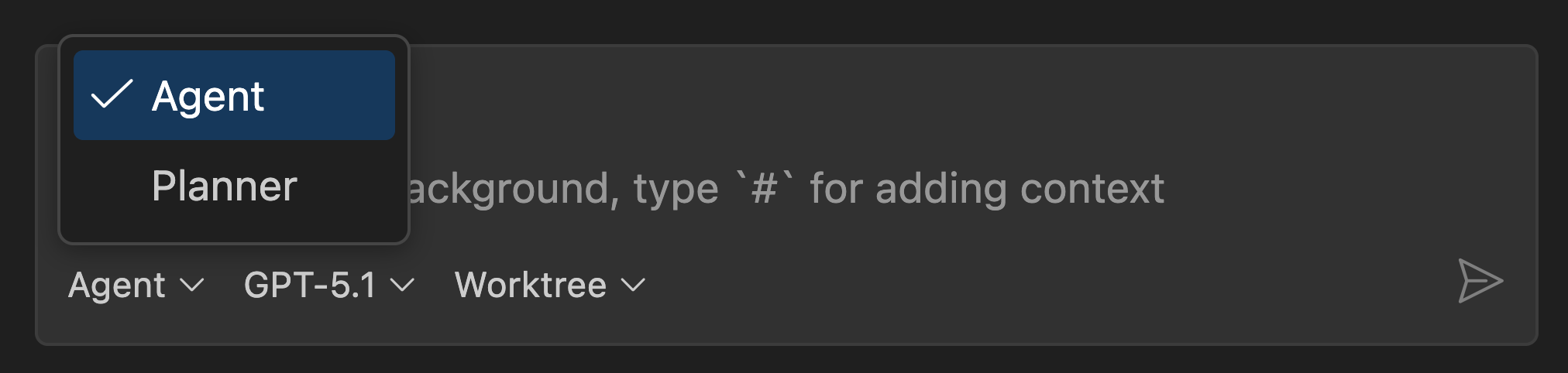
Learn more about defining custom agents in our documentation.
Run agents as subagents (Experimental)
When an agent needs to solve a complex issue, it can delegate tasks to subagents. Subagents work independently from the main chat session and have their own context window. This helps the main conversation to stay focused on the high-level objective and helps to manage context window limitations.
With this release, you can customize subagents via custom agents. Custom agents let you define specialized personas for the AI, tailoring their behavior to specific tasks or domains. For example, a code reviewer agent focuses on reviewing code rather than make code changes.
To use custom agents as subagents, follow these steps:
- Enable chat.customAgentInSubagent.enabled
- Create a custom agent with the Chat: New Custom Agent command, if you don't have one yet.
- In chat, ask the model "what subagents can you use?" to see the list of available subagents. Your custom agent should appear in the list.
- Enter a prompt that meets the requirements for your custom agent. The language model uses the custom agent description and arguments to determine if it should be used for your request.
To prevent a custom agent from being used as a subagent, set the metadata property infer to false in the *.agent.md file.
Learn more about using subagents in chat
Enterprise and Security Enhancements
Organizations gain greater control with advanced policy options. Enterprise administrators can restrict tool auto-approvals, disable specific agent chat modes, and enforce Codespaces policies to ensure compliance without sacrificing developer efficiency.
Platform, Extension, and Engineering Improvements
- Progressive rollout for Insiders and Stable users ensures a smooth upgrade
- Faster documentation search powered by open-sourced docfind
- Modernized, type-safe build scripts for improved maintenance
- Unified Copilot extensions, inline suggestions now come solely from Copilot Chat
- Key contributions to major extensions and extensive bug fixes
Takeaway
VS Code 1.107 sets a new benchmark for developer productivity, blending AI, automation, and enterprise controls into a cohesive platform. With its powerful multi-agent orchestration and advanced chat capabilities, this release empowers teams to work smarter, faster, and more collaboratively than ever before.
Let's Put These AI Tools to Work for You
Thanks for reading! The enterprise controls and multi-agent capabilities in this release signal a major shift in how organizations will approach AI-assisted development. But rolling out these tools effectively, from policy configuration to custom agent design, requires deep experience across both software architecture and team workflows. I have spent more than 20 years helping businesses of all sizes turn complex technology into competitive advantages.
If your organization is evaluating how to adopt these new AI capabilities securely and at scale, I can help you build a strategy that works. From custom agent development to automation pipelines that integrate with your existing systems, my software development and automation services are designed to deliver measurable outcomes. I would love to discuss your specific challenges - schedule a free consultation and let's explore how to make AI work for your team.

Source: code.visualstudio.com/updates


VS Code 1.107: Multi-Agent Orchestration and AI Tools Redefine Developer Productivity