Today’s organizations are under constant pressure to safeguard sensitive data and ensure that employees remain productive. Microsoft Edge for Business is positioning itself as the world’s first secure enterprise AI browser by fusing advanced security architecture with intelligent features. Edge for Business is redefining what companies can expect from their browsing experience.
Personally , I've been around since the days of Netscape and Internet Explorer so to watch Microsoft fumble around with Edge for years had been disappointing to say the least. However, the recent transition to an AI based browser is positioning Edge as a contender in the AI Browser Wars.
I've enjoyed the new browser based CoPilot AI and even the News page feature in the new version. However my favorite feature is Edge's ability to markup PDFs in the browser. Along with the integrated AI feature, the PDF tool allows me to discuss research papers and mark them up without leaving the browser. This competes directly with Adobe Acrobat and Chrome. Try it out in Edge today, just open a PDF to start highlighting and discussing with your CoPilot!
Key Takeaways
- World’s First Secure Enterprise AI Browser: Microsoft Edge for Business now integrates Microsoft 365 Copilot and Microsoft Graph directly into the browser, balancing advanced AI productivity with strict enterprise security.
- New "Copilot Mode": An opt-in interface that unlocks agentic capabilities, including:
- Agent Mode: Automates multi-step workflows on IT-approved websites.
- Intelligent New Tab Page: Features a combined chat/search box and a Daily Briefing of meetings and tasks.
- Advanced Reasoning: Copilot can now synthesize information across up to 30 open tabs (including local files and internal sites), summarize YouTube videos, and query browsing history using natural language.
- Enterprise-Grade Security: All AI features honor existing Data Loss Prevention (DLP) policies. Enterprise Data Protection ensures Microsoft does not use your data to train its models.
- Contractor & BYOD Protection: New controls extend Intune app protection policies to unenrolled Windows devices, allowing secure access for contractors without risking data leakage (e.g., blocking copy/paste to local drives).
- Data Leak Prevention Tools:
- Watermarking: Visual overlays on sensitive sites/files to remind users of confidentiality.
- Protected Clipboard: Granular control over what data can be copied and pasted between managed and unmanaged applications.
- Unified Management: Admins can now manage Edge policies across Windows, macOS, iOS, and Android from a single dashboard in the Microsoft 365 admin center.
Next-Generation Security Features
At its core, Edge for Business is anchored in Zero Trust security. This approach only permits legitimate users and devices to access corporate resources, minimizing the risk of unauthorized exposure. The browser’s data loss prevention (DLP) tools, powered by real-time AI, identify and block threats before they can escalate. Isolated workspaces further ensure that business and personal data never intermingle, reducing vulnerability.
- Automatic Data Protection: Security policies tightly regulate copy, paste, download, and upload actions, keeping data safe at every touchpoint.
- Continuous Threat Detection: Microsoft Defender SmartScreen, combined with AI analytics, continuously monitors for malicious activity, thwarting phishing and other cyberattacks.
- Granular Policy Controls: IT teams have the flexibility to tailor access and security measures, aligning the browser’s behavior with organizational needs and compliance requirements.
AI That Drives Productivity
Edge for Business is now a catalyst for smarter work. The browser integrates Copilot for Microsoft 365, an AI assistant that delivers personalized recommendations, automates routine workflows, and enhances search capabilities. Employees can draft communications, summarize documents, and retrieve information without leaving the secure browser environment.
- Contextual Insights: Copilot utilizes company data (while respecting privacy) to offer actionable suggestions, empowering faster decision-making.
- Integrated Workflows: With tools for launching apps, joining meetings, and managing tasks built right into the browser, users enjoy seamless transitions and improved efficiency.
Introducing Copilot Mode
Edge for Business is taking AI integration a step further with the introduction of Copilot Mode, a dedicated interface designed to transform the browser into an intelligent, proactive partner.
Copilot Mode is an opt-in experience that unlocks advanced, agentic capabilities while maintaining strict enterprise controls. Once enabled by IT and toggled on by the user, it provides a suite of features designed to anticipate needs and accelerate workflows:
- Agent Mode: This feature moves beyond simple chat to actual task automation. It can handle multi-step workflows on approved websites, effectively "doing" the work for you. To ensure security, it operates only on specific sites allow-listed by IT, and users maintain full control to interrupt the process at any time.
- Intelligent New Tab Page: The standard new tab is replaced with a Copilot-inspired interface that combines search and chat into one. It features a Daily Briefing, which intelligently summarizes your upcoming meetings, tasks, and priorities based on your browser context and Microsoft Graph data.
- Multi-Tab Reasoning: Gone are the days of manually cross-referencing information. Copilot can now analyze content across up to 30 open tabs including internal sites, PDFs, and local files, to answer complex questions that require synthesizing data from multiple sources.
Crucially, Copilot Mode respects the "secure by design" philosophy. It honors all existing Data Loss Prevention (DLP) policies, ensures commercial data protection (meaning Microsoft doesn't train on your data), and requires explicit activation, giving organizations full control over the pace of AI adoption.
Simplified IT Management and Deployment
For IT administrators, simplicity and scalability are paramount. Edge for Business seamlessly integrates with Microsoft Intune and other management platforms, streamlining deployment, updates, and policy management across the enterprise. Organizations benefit from centralized oversight without disrupting end users.
- Unified Administration: Central dashboards provide real-time visibility into usage patterns, security events, and compliance metrics.
- Effortless Updates: Automatic patching ensures that every endpoint is protected with the latest security features.
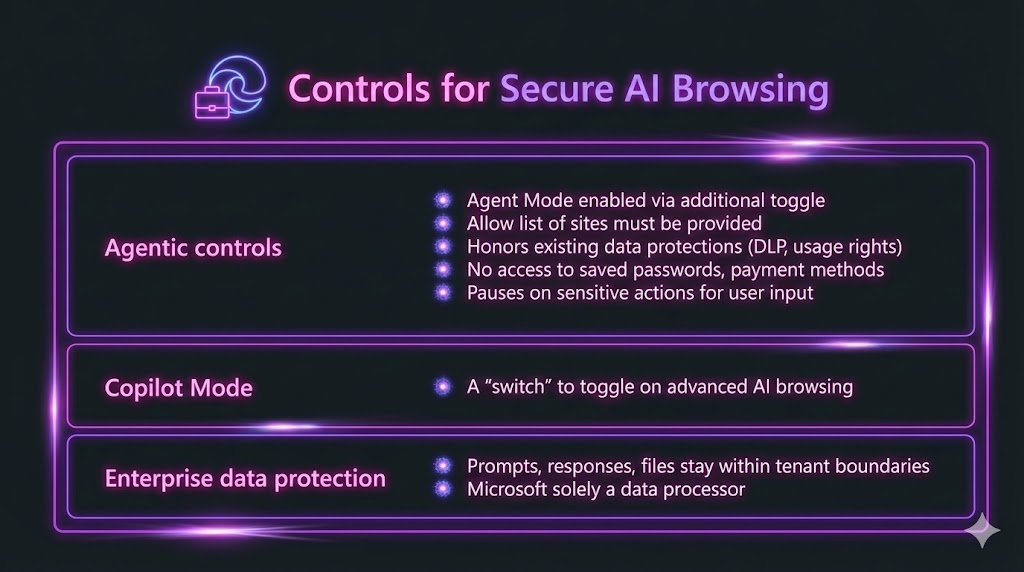
Image Credit: Microsoft (Restyled with Gemini Pro Image)
User-Centric Experience and Compatibility
Edge for Business prioritizes a familiar, intuitive interface while delivering enterprise-grade protection. Its compatibility with both legacy applications and cloud-based services guarantees a smooth transition for organizations. Deep integration with Microsoft 365, Azure, and other business platforms means employees have instant access to essential workplace resources.
Takeaway: A New Era for Enterprise Browsers
Microsoft Edge for Business stands out by uniting robust security and AI-powered productivity in a single, enterprise-ready solution. As digital transformation accelerates, this browser offers a new gold standard for how businesses can protect data, empower users, and streamline IT management. Edge for Business isn’t just keeping pace with the evolving digital landscape, it’s setting the direction for the future of enterprise browsing.
Checkout Microsoft's Blog for a deep dive into the browsers enterprise features:
- Introducing Copilot Mode
- Multi-tab reasoning and other AI upgrades
- Secure AI browsing controls
- Protect browsing for contractors
- Watermarking for sensitive files and sites
- Protecting copy/paste actions
- Unify policy management across platforms
- Simplify prerelease testing with built-in flexibility
- Take control of browser extensions
- Get started today
Source: Microsoft Blog


Microsoft Edge for Business is Redefining Enterprise Security and Productivity