AI-driven productivity is entering a new era, with Microsoft preparing a significant upgrade for its digital assistant Copilot. By integrating the advanced GPT-5.1 language model and rolling out innovative tools for task and workflow management, Microsoft is positioning Copilot as a standout in the evolving landscape of AI assistants.
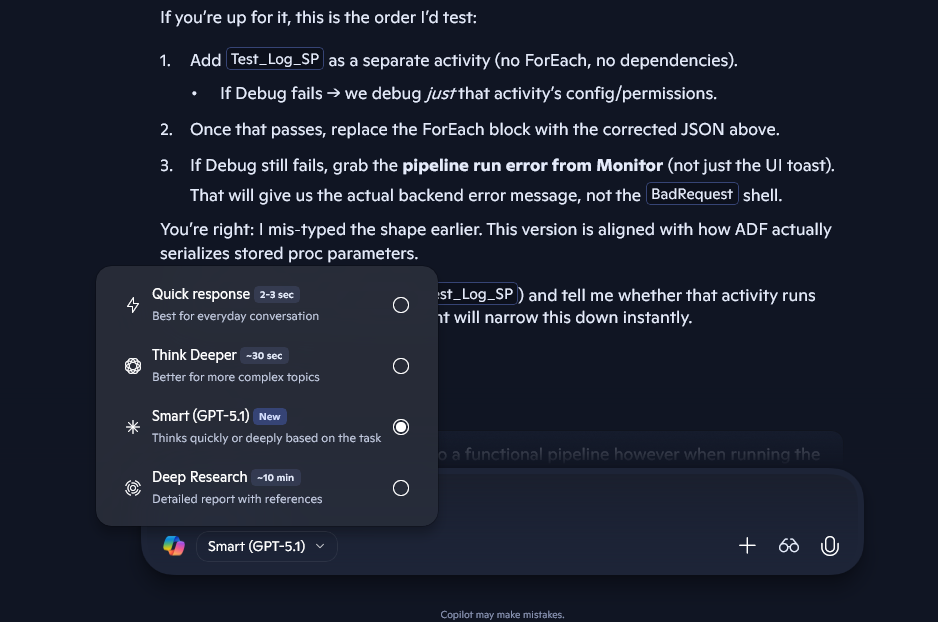
GPT-5.1 Powers Smarter Conversations
Copilot’s Smart mode is getting a major boost. The transition from GPT-5 to GPT-5.1 promises users a more sophisticated experience, with improved comprehension and nuanced responses to complex queries. Some Windows users are already seeing these enhancements, and Microsoft is actively expanding access across web and mobile platforms. With Smart mode as the default, Copilot is set to become even more reliable for detailed, context-rich conversations.
Unleashing Creativity: 3D Model Generation and Imagine Gallery
Microsoft continues to expand Copilot’s creative toolkit. Recent enhancements allow users to generate and remix 3D models straight from images within the Imagine gallery. This feature not only broadens creative possibilities but also cultivates a vibrant community where user-generated content takes center stage. Copilot is evolving into a valuable platform for those interested in visual design and 3D experimentation.
Reminders: Integrated Task and Note Management
The new Reminders feature stands out as a comprehensive organizational tool. Users can easily create, track, and manage reminders, merging the convenience of note-taking with actionable prompts. Unlike other AI assistants that offer basic or fragmented reminder support, Copilot’s integrated approach makes organizing tasks intuitive and efficient, directly within the assistant’s interface.
Projects: Organizing Chats and Workflows
To further enhance productivity, Microsoft is introducing Projects, a feature designed for managing and categorizing chat histories. Projects make it easier to track ongoing conversations, tasks, and collaborative efforts, echoing advanced functionalities seen in platforms like ChatGPT but tailored for Copilot’s unique environment. This organizational layer is a game-changer for users juggling multiple threads and responsibilities.
Microsoft’s Strategic Focus: Productivity Meets Innovation
These updates underscore Microsoft’s strategic vision for Copilot: transforming it from a basic conversational agent to a powerful productivity companion. By blending cutting-edge AI with robust task and workflow management features, Microsoft is filling gaps left by other AI platforms, especially in organizational and creative support. The blend of advanced modeling with practical tools sets Copilot apart as a must-have for personal and professional productivity.
Takeaway: Copilot Sets a New Benchmark for AI Assistants
With GPT-5.1, Reminders, and Projects, Copilot is redefining expectations for what AI assistants can do. Users can anticipate a smarter, more creative, and highly organized digital partner, one that actively enhances productivity rather than simply answering questions. As these features continue to roll out, Copilot is poised to become an indispensable tool for modern workflows and creative pursuits.
Source: TestingCatalog


Microsoft Copilot’s Next Leap: GPT-5.1, Reminders, and Workflow Projects Redefine Productivity